
How to Organize Christmas with a Planner You Can Reuse Every Year
The festive season fills up quickly—traditions, recipes, days out, gifts. December gathers them all, sometimes before we've even realised it.
A Christmas planner gives those moments a home. It brings ideas, plans, and traditions into one clear space so you can see the season at a glance and shape it the way you want.
Instead of starting from scratch every December, you return to the same festive hub each year. You can keep what you love, add what’s new, and watch your traditions grow over time.

Why Create a Christmas Planner?
There's a moment each December, often when you're hunting for the wrapping paper you were certain you bought last year, when the season starts to feel a touch… expansive. Not chaotic, exactly. Just full. Wonderfully full. But full all the same.
A Christmas planner gathers that fullness and gives it some shape. Think of it as a gentle home for the season: a place where traditions, ideas, recipes, plans, and good intentions can live side by side.
It can hold:
The traditions you repeat every year – the bakes, the playlists, the familiar rituals that make December feel like your December.
The practical side of Christmas planning – gifts, cards, outings, lists, dates, all in one view, so nothing quietly drifts out of sight.
The memories and notes you want to carry into next year – because future you will absolutely appreciate remembering which Christmas jam recipe won the family vote.
The beauty of a Christmas planner is how it stretches across years. You return to it each festive season, pick up where you left off, and let it evolve as your traditions do.
If you'd like a place to begin, keep reading. We'll walk through exactly how to create your Christmas planner on Hylark and share six page ideas you can start using straight away.

How to Create a Christmas Planner
A Christmas planner works best when it lives somewhere flexible – a space that can shift with your traditions, evolve each year, and hold everything from recipes to wishlists without feeling cluttered.
Hylark is a digital workspace you can shape however you like. It gives you a clean, customizable home for all your festive planning. Whether you want to build from scratch or let AI do the early heavy lifting, you can set up your Christmas planner in minutes.
Here are a few ways to begin your Christmas planning on Hylark:
Start with Hylark AI
Open a chat with Hylark AI and describe the pages you want in your Christmas planner. Maybe it’s a winter bucket list page, a festive recipe page, or a Christmas card and gift tracker.
Hylark AI will suggest a custom layout and create your pages for you, ready for you to step straight into planning.
Use custom page templates
Browse a selection of ready-made templates created by our team and choose the ones that match your plans. Once you’ve picked a template, you can customize it however you like: adjust the structure, rename sections, and add the festive details that make it feel like yours.
Build it your own way
Prefer something hands-on? Start with a blank page and build your own Christmas planner using Hylark's flexible building blocks. Add the fields you want, choose your view (Spreadsheet, Kanban, Line, or Tile), and shape your festive planning space exactly the way you imagine it.
Once your space is set up, you can begin adding pages.

Here are six Christmas planner pages you can start using right away, and links to examples we've created on Hylark so you can see them in action.
Create a winter Bucket List Page
Start your Christmas planner with a winter bucket list. A page that gathers everything you’d love to experience this season. It’s part inspiration board, part planning tool, and a helpful way to ensure the things that matter most don’t quietly slip through the festive rush.

Your winter bucket list might include:
Traditions you always look forward to
New places you’d like to explore
Films to watch with family or friends
Cozy evenings at home, creative projects, or at-home celebrations
On Hylark, you can shape the page however you like. Add statuses or tags, keep details like cost or location, or simply tick things off as you go. It’s your list, arranged in your way.
Create a Christmas Gift Wishlist Page
A gift wishlist page gathers the things you’d genuinely appreciate this year. Useful, thoughtful, long-lasting ideas aligned with your values. It takes the pressure off others to guess, and helps avoid gifts that go unused or quietly re-gifted in February.

You might include:
Items you’ve been considering or saving for
Ethical or sustainable swaps you’d love to try
Experiences you’d enjoy more than physical gifts
Notes on why something matters to you
Your wishlist becomes a gentle guide for anyone asking, “What would you like this year?”
On Hylark, you can shape your wishlist however you like: add tags to categorize items, include links, prices, brands, images, or priority labels to help others understand what would be most meaningful.
Create a Festive Recipe Hub
Christmas foods and drinks often carry memories; the Christmas pudding you make every year, the Christmas jam that only appears once each December. A festive recipes hub brings all your favorites into one place you can return to year after year.

You might include:
Favorite bakes and desserts
Cozy drinks and mocktails
Holiday breakfasts or brunches
That secret ingredient in your Christmas jam
You can link to recipes, store your own versions, add photos and notes you always forget, like the reminder that your Christmas pudding needs an extra 10 minutes in your oven.
Shape the page on Hylark however you like: add labels for cuisine or cooking time, create difficulty ratings, include ingredient lists and servings, or organize everything with tags you can filter in a click.
Create a Board Game Inventory Page
If games are part of your Christmas traditions, a board game inventory page keeps everything organized for long afternoons and evenings together. It gives you a clear view of what you own and a space to store ideas for what to play next.

You might include:
A list of games you already own
Notes on who enjoys which game
A reminder of the rules
New games you’d like to try
This page becomes a helpful way to choose the Christmas Day lineup or plan a games night with friends.
On Hylark, you can add tags for the number of players, game duration, last played date, score or rating, and any notes you want to remember next time.
Create a Christmas Card Tracker Page
Sending cards is a tradition many people treasure, and a Christmas card tracker page helps you keep that tradition going year after year. It gives you a clear view of who you’re sending cards to, what you’ve written, and what you want to remember for next December.
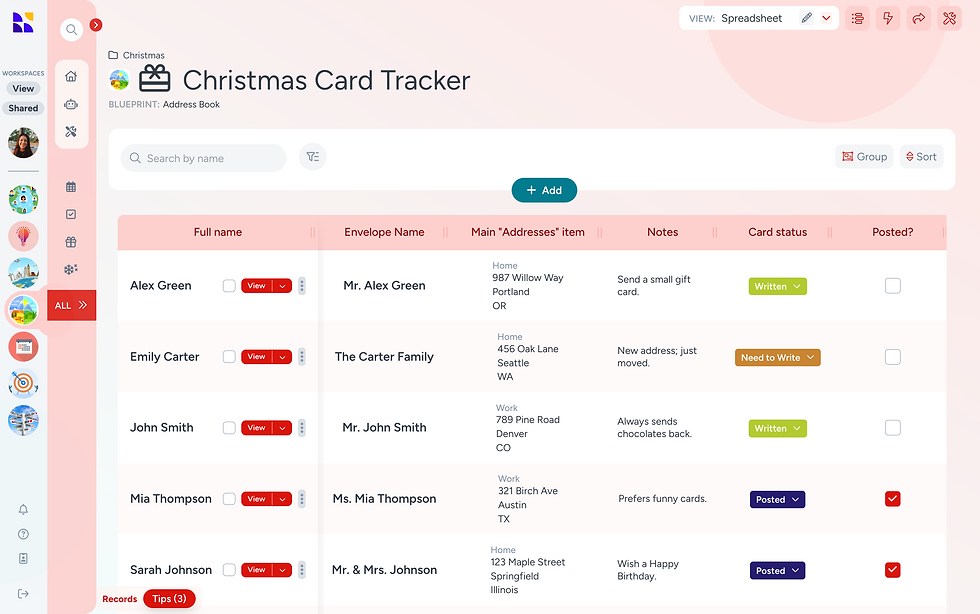
You might track:
Names and addresses
Whether you send a card, letter, or digital note
Any changes to addresses or preferred names
On Hylark, you can add fields for full names, preferred names, addresses, notes, and card status - “Written”, “To Write”, “Posted”. A simple way to avoid the “Did I already send one?” moment.
Create a Gift Planner Page
Whilst a Christmas Wishlist captures what you would love to receive, a Christmas gift planner keeps track of the gifts you're choosing for others. It stores the practical side of gifting and it works just as well for birthdays, weddings, or any other moment you want to plan something thoughtful.

You might include:
Gift ideas for each person
Budgets per person
Links to items you’re considering
Notes on what you gave in previous years
Reminders for ordering or posting dates
On Hylark, you can shape this page however you need: add tags for recipients or occasions, include links, prices, images, notes, or use a status field to track each stage of the gift from idea to delivery.
If you enjoy seasonal planning, you might also like our guide on five pages to create for New Year planning and keeping your goals on track.
If you’d like a flexible digital home for your festive pages, Hylark gives you a space to build a Christmas planner that grows with you. One that you can return to year after year as your traditions evolve.